3. EXT: Car demo
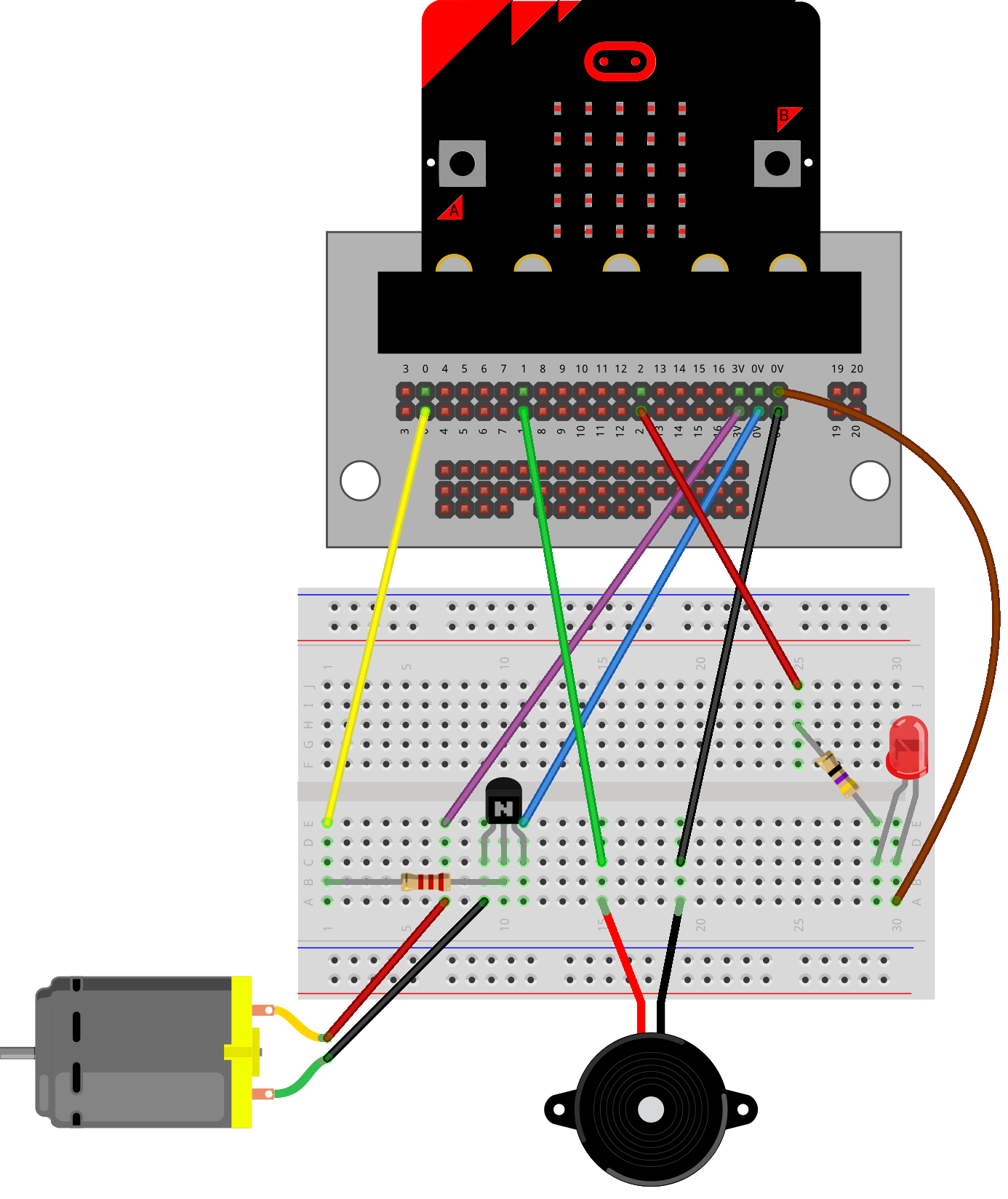
The code below is a demonstration of a micro:bit-based embedded system that simulates three vehicle subsystems: air conditioning, sound, and lights.
The program provides a menu-driven interface that allows the user to select a subsystem using Button A and demonstrate it using Button B.
Each subsystem is demonstrated using three predefined output levels to simulate different operating settings.
This is based on the work of Miles M. and Nate L. term2 2026.
"""
Vehicle Systems Demonstrator

A micro:bit-based embedded system that demonstrates three vehicle subsystems:
air conditioning, sound, and lights.

The program provides a menu-driven interface that allows the user to select
a subsystem using Button A and demonstrate it using Button B. Each subsystem is
demonstrated using three predefined output levels to simulate different
operating settings.

Inputs:
    Button A - Change selected subsystem.
    Button B - Run subsystem demonstration.

Outputs:
    pin0 - Motor/fan output.
    pin1 - buzzer output.
    pin2 - LED output.

The LED display is used to show menu selections, operating levels, and
system status messages.
"""

from microbit import *
import music

# turn off in built speaker so that the in-built speaker does not also play sounds.
speaker.off()

# Constants
SCROLL_SPEED = 70
DEMO_TIME = 4000
DEMO_GAP_TIME = 1000
DISPLAY_INTERVAL = 2000

# Subsystem Data Dictionary
# This maps each option ID to its name and its respective levels/settings
MODULES = {
    1: {
        "name": "AC",
        "type": "analog",
        "pin": pin0,
        "levels": {1: 250, 2: 500, 3: 1023}
    },
    2: {
        "name": "SOUND",
        "type": "sound",
        "pin": pin1,
        "levels": {
            1: {"vol": 155, "bpm": 120, "tune": music.BIRTHDAY},
            2: {"vol": 200, "bpm": 80,  "tune": music.WEDDING},
            3: {"vol": 255, "bpm": 100, "tune": music.FUNERAL}
        }
    },
    3: {
        "name": "LIGHTS",
        "type": "analog",
        "pin": pin2,
        "levels": {1: 250, 2: 500, 3: 1023}
    }
}

# Initialise tracking variables
last_display_time = running_time()
current_module_selected = 1
previous_module_selected = None


def load_animation():
    clocks = [Image.CLOCK12, Image.CLOCK3, Image.CLOCK6, Image.CLOCK9, Image.CLOCK12]
    display.show(clocks, delay=120)
    display.clear()
    sleep(250)


def show_current_option():
    global previous_module_selected, last_display_time

    if (previous_module_selected != current_module_selected
            or running_time() - last_display_time > DISPLAY_INTERVAL):

        # Grab the module name instantly from our dictionary using the key
        current_module_name = MODULES[current_module_selected]["name"]
        display.scroll(current_module_name, SCROLL_SPEED)
        last_display_time = running_time()  # Reset the timer

    previous_module_selected = current_module_selected
    sleep(200)


# Unified demonstration loop
def run_subsystem_demo(module_id):
    module = MODULES[module_id]
    display.scroll('DEMO...', SCROLL_SPEED)

    # Loop through levels 1 to 3
    for level in range(1, 4):
        display.show(level)
        settings = module["levels"][level]

        if module["type"] == "analog":
            # Handles both AC and Lights dynamically
            module["pin"].write_analog(settings)
            sleep(DEMO_TIME)
            module["pin"].write_analog(0)

        elif module["type"] == "sound":
            # Handles sound settings mapping
            set_volume(settings["vol"])
            music.set_tempo(bpm=settings["bpm"])
            music.play(settings["tune"], wait=False, pin=module["pin"])
            sleep(DEMO_TIME)
            music.stop()

        sleep(DEMO_GAP_TIME)

    display.clear()


###################################################################

# Welcome and button hints
music.play("C", pin=pin1)
display.scroll('WELCOME!', SCROLL_SPEED)
load_animation()
display.scroll('MODULE A -> DEMO B', SCROLL_SPEED)
load_animation()

# Main loop
while True:
    show_current_option()

    if button_a.was_pressed():
        current_module_selected += 1
        # Rollover dynamically based on how many elements are in our dictionary
        if current_module_selected > len(MODULES):
            current_module_selected = 1

    if button_b.was_pressed():
        load_animation()

        # Call the unified function passing the current active ID
        run_subsystem_demo(current_module_selected)

        load_animation()
        previous_module_selected = None   # to cause module display to update

    sleep(50)